🎉 Up to 70% Off Selected ItemsShop Sale

2026 Goal Planner for Android & iPads
This daily, dated digital planner has everything you need to set your goals and create a plan to achieve them. From setting actionable goals to managing priorities day-to-day, this planner will support you every step of the way.
Note: This is the classic version of the planner and does not include the calendar scheduling integration for iPads. This version is perfect for you if you use an Android tablet or prefer a simpler planner on your iPad without the iOS shortcut integration. To shop the 2026 planner for iPads with calendar scheduling links, click here.
BUILD YOUR PERFECT PLANNER
This planner now includes 20 VERSIONS to choose from, find your perfect planner layout:
• Choose between 10 weekly page layout options (8 landscape and 2 portrait page options)
• Do you prefer to use a calendar with weeks starting on Sunday or Monday? Both options are included for each version.
• Choose between 10 weekly page layout options (8 landscape and 2 portrait page options)
• Do you prefer to use a calendar with weeks starting on Sunday or Monday? Both options are included for each version.
You'll have instant access to all versions, just use the download guide to "build" your perfect planner!
THIS PLANNER IS PACKED WITH FEATURES!
Dated Pages: Annual, Monthly, Weekly and Daily dated planning pages with hyperlinks for easy navigation (both Sunday start and Monday start week options included). Dated calendar pages run from January through December 2026.
Monthly Bonus Pages: In addition to the standard monthly planning spread, each month has 5 linked bonus pages: reflection, planning, habit tracking, financial budgeting and a blank page
Weekly Bonus Pages: In addition to the standard weekly calendar page, each week has 5 linked bonus pages: weekly focus/planning, a planner view (can be used for meal planning/assignment tracking), wellness tracking, to do list and a notes page.
Annual Pages: This planner includes annual planning pages for the current year and the next two years (2026, 2027 and 2028). This allows you to capture important dates and details beyond the 12 months included in your planner. Each year has 8 dedicated pages: year at a glance, key dates, quarterly view, wish list/bucket list, tracking, health and finance summaries and a page for notes/a vision board.
Goal Setting: The complete "Goal Clarity Roadmap" section includes templates designed to guide you through the process of reflecting, clarifying your vision, optimizing your time and creating actionable goals.
Goal Planning: This section includes space to plan and track 12 goals throughout your year. Each goal links to five planning pages: a page to define your goal, action plan, notes, gantt chart and an interactive progress view template.
Custom Sections: 24 customizable note sections, each section links to 15 blank pages. You can easily build out your sections with the included template pages to capture project plans, important notes, a reading log, etc. The possibilities are endless!
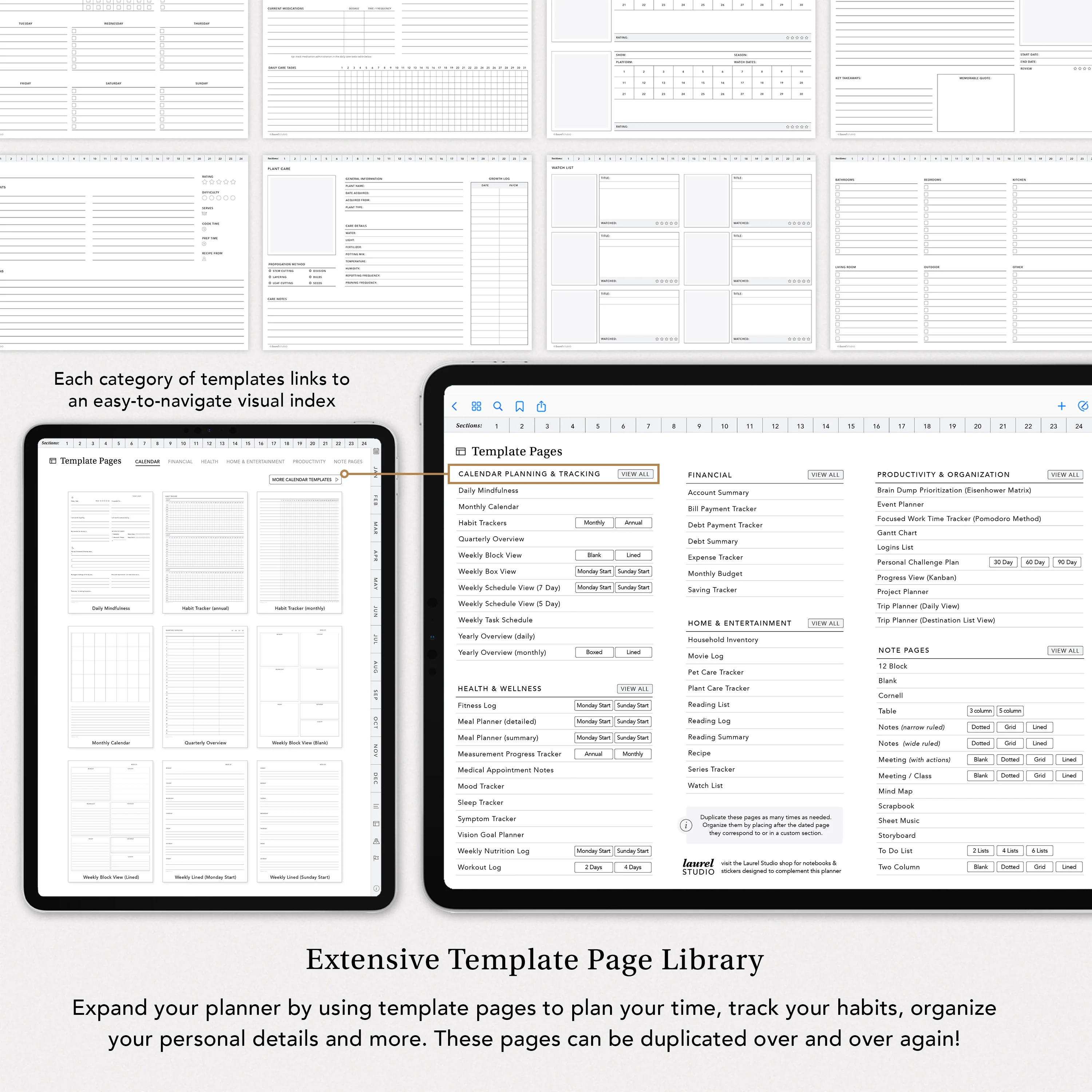
Bonus Template Pages: Library of 85+ bonus planning page templates that can be duplicated as many times as needed.
Sticker Set: 700+ stickers organized in a sticker book for use in Goodnotes (individual png images also included for non-goodnotes users)
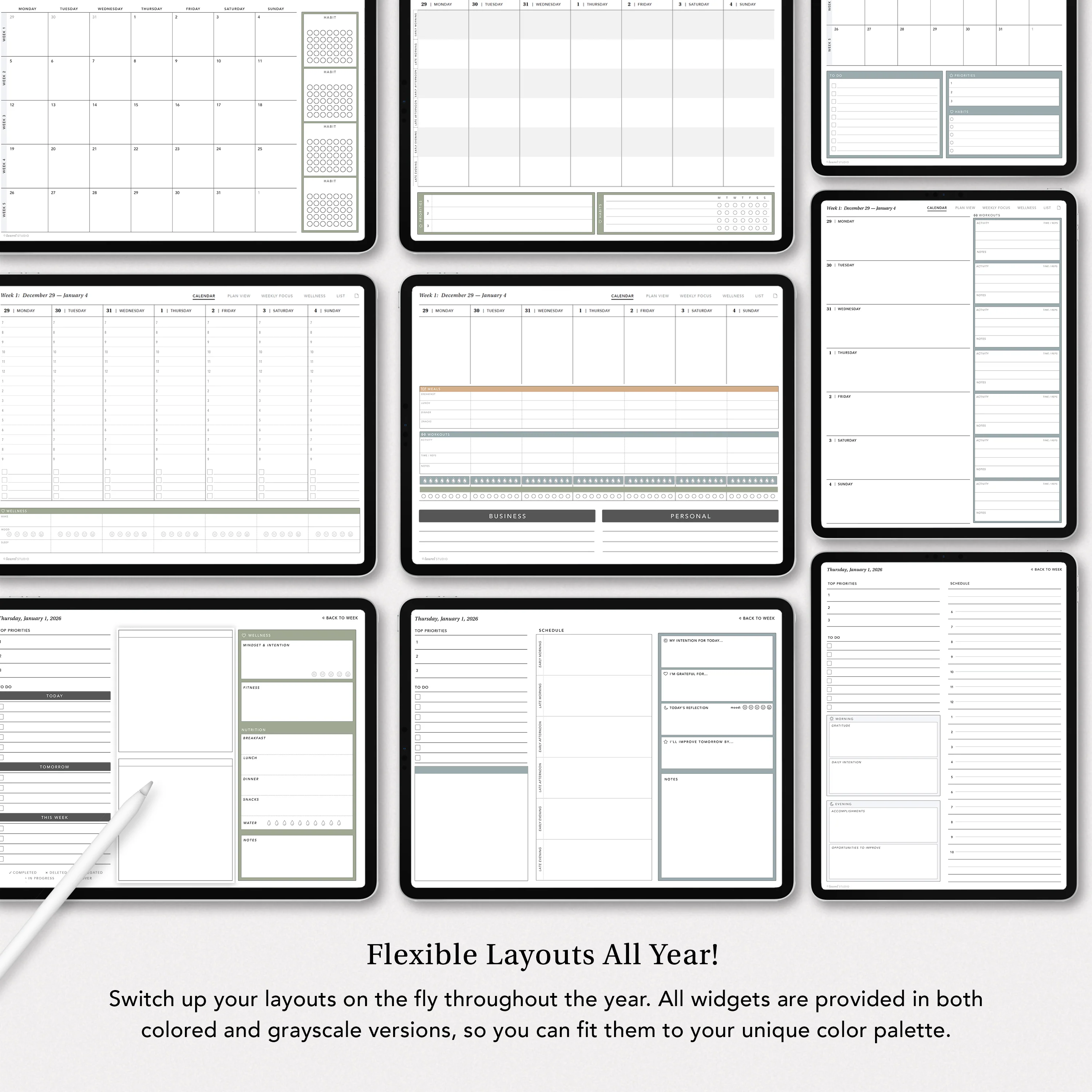
Layout Widget Stickers: You have endless customization options for your monthly, weekly and daily dated planning pages with the included set of layout "widget" stickers that are designed to fit seamlessly in the open margins/footers of the dated monthly, weekly and daily pages.
Decorative Covers: Switch up your planner thumbnail by changing the cover of your planner to match your personal aesthetic. This bonus includes 10 decorative planner cover options.
Planner Details
Dated planner pages from January through December (12 dated monthly pages, 52 dated weekly pages, 365 daily dated pages). All dated pages are hyperlinked for easy navigation: year at glance page links to each month/day/week, monthly pages link out to both weekly spreads and daily pages, weekly spreads link out to daily pages. Daily pages link back to weeks. Tabs along right side of every page also link to monthly pages.
Annual Pages allow you to plan and track details for the current year and the next two years. Each year links to 8 total pages:
- Calendar: this year-at-a-glance view allows you to review dates. the current year page links out to each individual month/week/day for easy navigation.
- Key Dates: write down birthdays or big events so you don't lose track of them
- Quarterly View: record any high level details or general to-dos for each quarter of the year
- Wish List: list out some of your aspirations for the year and check them off as you make them happen!
- Tracker: track for a full year in this single view - perfect for mood or cycle tracking
- Health Summary: track the most important details of your personal health throughout the year
- Finance Summary: set financial goals for yourself and track your spending/saving in a single view month-to-month
- Notes Page: this blank page has a subtle grid background, perfect for taking notes or creating a vision board
Each month links to 6 total pages:
- Calendar: this standard calendar layout links out to all daily and weekly calendar pages. You can easily customize the right side margin of this page with the included widget sticker set.
- Reflection: think back on the past month, what you've accomplished and how you're feeling about each of the key areas of your life
- Planning: set your intentions and choose the goals you plan to pursue in the upcoming month
- Tracker: track a number of habits throughout the month in this list view
- Finance: track your high-level earning/spending through this summary view
- Blank Note page: perfect for a scratch pad, vision board or to overlay any template page
Each week links out to 6 total pages:
- Calendar: choose from 5 different weekly calendar layout options (see listing photos for details), this calendar page links out to each daily page - simply tap on the date number.
- Plan View: this alternate weekly view is perfect for meal planning, assignment/lesson planning, managing workout details, etc
- Weekly Focus: reflect on your past week and start your week off with a plan by clarifying the goal milestones you'll focus on
- Wellness: track all your wellness details including sleep, movement, water intake, nutrition and self care
- List: this 6-section to-do list layout is perfect for managing an ongoing to do list. Designate each section for a specific project, area of your life, family member, etc.
- Blank Note page: perfect for a scratch pad, vision board or to overlay any template page
"Widget" sticker designs allow you to quickly adjust the layout and content of your dated pages to fit your needs - add schedule blocks, priorities, habit trackers and more to your dated pages. These stickers are included in the GoodNotes sticker book and saved as pre-cropped PNGs. They are sized to fit perfectly over the flexible margin/footer areas on your daily, weekly and monthly pages. For more details on how this sticker set works, watch the walk-through video linked above!
700+ stickers in a tabbed sticker book (great for organizing and building your sticker collection). This sticker book is compatible with the Goodnotes app only. For other app users, I've also included all of the sticker images saved as pre-cropped PNG images. They are organized into folders for ease of use. I recommend saving the entire collection to your device or a cloud drive that you can easily access from your PDF markup app.
85+ bonus page templates included - all pages can easily be duplicated as many times as needed. Templates include alternate calendar layouts, health & wellness tracking, financial organization, household management, book/entertainment logs, productivity templates and note pages (see listing photos for full list of template pages)
24 customizable note sections - each section number links to a section divider page. Each section divider links to 15 blank pages. Your note sections give you the ability to organize each area of your life. Designate a section for organizing your reading logs, recipes, financial info, etc.
Files Included
1. 2026 Planner Download Guide PDF - this guide includes links to every version of the planner, allowing you to "build" and download your perfect planner.
The download guides also include links to download the sticker set and bonus covers that correspond with your chosen planner version:
- GoodNotes sticker book file (for use in GoodNotes only)
- Zip file of all individual sticker PNG files (for use on desktop or in any other PDF annotation app)
- Decorative cover set PDF file (10 alternate cover options)
$6.38
Original: $21.25
-70%2026 Goal Planner for Android & iPads—
$21.25
$6.38More Images






2026 Goal Planner for Android & iPads
This daily, dated digital planner has everything you need to set your goals and create a plan to achieve them. From setting actionable goals to managing priorities day-to-day, this planner will support you every step of the way.
Note: This is the classic version of the planner and does not include the calendar scheduling integration for iPads. This version is perfect for you if you use an Android tablet or prefer a simpler planner on your iPad without the iOS shortcut integration. To shop the 2026 planner for iPads with calendar scheduling links, click here.
BUILD YOUR PERFECT PLANNER
This planner now includes 20 VERSIONS to choose from, find your perfect planner layout:
• Choose between 10 weekly page layout options (8 landscape and 2 portrait page options)
• Do you prefer to use a calendar with weeks starting on Sunday or Monday? Both options are included for each version.
• Choose between 10 weekly page layout options (8 landscape and 2 portrait page options)
• Do you prefer to use a calendar with weeks starting on Sunday or Monday? Both options are included for each version.
You'll have instant access to all versions, just use the download guide to "build" your perfect planner!
THIS PLANNER IS PACKED WITH FEATURES!
Dated Pages: Annual, Monthly, Weekly and Daily dated planning pages with hyperlinks for easy navigation (both Sunday start and Monday start week options included). Dated calendar pages run from January through December 2026.
Monthly Bonus Pages: In addition to the standard monthly planning spread, each month has 5 linked bonus pages: reflection, planning, habit tracking, financial budgeting and a blank page
Weekly Bonus Pages: In addition to the standard weekly calendar page, each week has 5 linked bonus pages: weekly focus/planning, a planner view (can be used for meal planning/assignment tracking), wellness tracking, to do list and a notes page.
Annual Pages: This planner includes annual planning pages for the current year and the next two years (2026, 2027 and 2028). This allows you to capture important dates and details beyond the 12 months included in your planner. Each year has 8 dedicated pages: year at a glance, key dates, quarterly view, wish list/bucket list, tracking, health and finance summaries and a page for notes/a vision board.
Goal Setting: The complete "Goal Clarity Roadmap" section includes templates designed to guide you through the process of reflecting, clarifying your vision, optimizing your time and creating actionable goals.
Goal Planning: This section includes space to plan and track 12 goals throughout your year. Each goal links to five planning pages: a page to define your goal, action plan, notes, gantt chart and an interactive progress view template.
Custom Sections: 24 customizable note sections, each section links to 15 blank pages. You can easily build out your sections with the included template pages to capture project plans, important notes, a reading log, etc. The possibilities are endless!
Bonus Template Pages: Library of 85+ bonus planning page templates that can be duplicated as many times as needed.
Sticker Set: 700+ stickers organized in a sticker book for use in Goodnotes (individual png images also included for non-goodnotes users)
Layout Widget Stickers: You have endless customization options for your monthly, weekly and daily dated planning pages with the included set of layout "widget" stickers that are designed to fit seamlessly in the open margins/footers of the dated monthly, weekly and daily pages.
Decorative Covers: Switch up your planner thumbnail by changing the cover of your planner to match your personal aesthetic. This bonus includes 10 decorative planner cover options.
Planner Details
Dated planner pages from January through December (12 dated monthly pages, 52 dated weekly pages, 365 daily dated pages). All dated pages are hyperlinked for easy navigation: year at glance page links to each month/day/week, monthly pages link out to both weekly spreads and daily pages, weekly spreads link out to daily pages. Daily pages link back to weeks. Tabs along right side of every page also link to monthly pages.
Annual Pages allow you to plan and track details for the current year and the next two years. Each year links to 8 total pages:
- Calendar: this year-at-a-glance view allows you to review dates. the current year page links out to each individual month/week/day for easy navigation.
- Key Dates: write down birthdays or big events so you don't lose track of them
- Quarterly View: record any high level details or general to-dos for each quarter of the year
- Wish List: list out some of your aspirations for the year and check them off as you make them happen!
- Tracker: track for a full year in this single view - perfect for mood or cycle tracking
- Health Summary: track the most important details of your personal health throughout the year
- Finance Summary: set financial goals for yourself and track your spending/saving in a single view month-to-month
- Notes Page: this blank page has a subtle grid background, perfect for taking notes or creating a vision board
Each month links to 6 total pages:
- Calendar: this standard calendar layout links out to all daily and weekly calendar pages. You can easily customize the right side margin of this page with the included widget sticker set.
- Reflection: think back on the past month, what you've accomplished and how you're feeling about each of the key areas of your life
- Planning: set your intentions and choose the goals you plan to pursue in the upcoming month
- Tracker: track a number of habits throughout the month in this list view
- Finance: track your high-level earning/spending through this summary view
- Blank Note page: perfect for a scratch pad, vision board or to overlay any template page
Each week links out to 6 total pages:
- Calendar: choose from 5 different weekly calendar layout options (see listing photos for details), this calendar page links out to each daily page - simply tap on the date number.
- Plan View: this alternate weekly view is perfect for meal planning, assignment/lesson planning, managing workout details, etc
- Weekly Focus: reflect on your past week and start your week off with a plan by clarifying the goal milestones you'll focus on
- Wellness: track all your wellness details including sleep, movement, water intake, nutrition and self care
- List: this 6-section to-do list layout is perfect for managing an ongoing to do list. Designate each section for a specific project, area of your life, family member, etc.
- Blank Note page: perfect for a scratch pad, vision board or to overlay any template page
"Widget" sticker designs allow you to quickly adjust the layout and content of your dated pages to fit your needs - add schedule blocks, priorities, habit trackers and more to your dated pages. These stickers are included in the GoodNotes sticker book and saved as pre-cropped PNGs. They are sized to fit perfectly over the flexible margin/footer areas on your daily, weekly and monthly pages. For more details on how this sticker set works, watch the walk-through video linked above!
700+ stickers in a tabbed sticker book (great for organizing and building your sticker collection). This sticker book is compatible with the Goodnotes app only. For other app users, I've also included all of the sticker images saved as pre-cropped PNG images. They are organized into folders for ease of use. I recommend saving the entire collection to your device or a cloud drive that you can easily access from your PDF markup app.
85+ bonus page templates included - all pages can easily be duplicated as many times as needed. Templates include alternate calendar layouts, health & wellness tracking, financial organization, household management, book/entertainment logs, productivity templates and note pages (see listing photos for full list of template pages)
24 customizable note sections - each section number links to a section divider page. Each section divider links to 15 blank pages. Your note sections give you the ability to organize each area of your life. Designate a section for organizing your reading logs, recipes, financial info, etc.
Files Included
1. 2026 Planner Download Guide PDF - this guide includes links to every version of the planner, allowing you to "build" and download your perfect planner.
The download guides also include links to download the sticker set and bonus covers that correspond with your chosen planner version:
- GoodNotes sticker book file (for use in GoodNotes only)
- Zip file of all individual sticker PNG files (for use on desktop or in any other PDF annotation app)
- Decorative cover set PDF file (10 alternate cover options)
Product Information
Product Information
Shipping & Returns
Shipping & Returns
Description
This daily, dated digital planner has everything you need to set your goals and create a plan to achieve them. From setting actionable goals to managing priorities day-to-day, this planner will support you every step of the way.
Note: This is the classic version of the planner and does not include the calendar scheduling integration for iPads. This version is perfect for you if you use an Android tablet or prefer a simpler planner on your iPad without the iOS shortcut integration. To shop the 2026 planner for iPads with calendar scheduling links, click here.
BUILD YOUR PERFECT PLANNER
This planner now includes 20 VERSIONS to choose from, find your perfect planner layout:
• Choose between 10 weekly page layout options (8 landscape and 2 portrait page options)
• Do you prefer to use a calendar with weeks starting on Sunday or Monday? Both options are included for each version.
• Choose between 10 weekly page layout options (8 landscape and 2 portrait page options)
• Do you prefer to use a calendar with weeks starting on Sunday or Monday? Both options are included for each version.
You'll have instant access to all versions, just use the download guide to "build" your perfect planner!
THIS PLANNER IS PACKED WITH FEATURES!
Dated Pages: Annual, Monthly, Weekly and Daily dated planning pages with hyperlinks for easy navigation (both Sunday start and Monday start week options included). Dated calendar pages run from January through December 2026.
Monthly Bonus Pages: In addition to the standard monthly planning spread, each month has 5 linked bonus pages: reflection, planning, habit tracking, financial budgeting and a blank page
Weekly Bonus Pages: In addition to the standard weekly calendar page, each week has 5 linked bonus pages: weekly focus/planning, a planner view (can be used for meal planning/assignment tracking), wellness tracking, to do list and a notes page.
Annual Pages: This planner includes annual planning pages for the current year and the next two years (2026, 2027 and 2028). This allows you to capture important dates and details beyond the 12 months included in your planner. Each year has 8 dedicated pages: year at a glance, key dates, quarterly view, wish list/bucket list, tracking, health and finance summaries and a page for notes/a vision board.
Goal Setting: The complete "Goal Clarity Roadmap" section includes templates designed to guide you through the process of reflecting, clarifying your vision, optimizing your time and creating actionable goals.
Goal Planning: This section includes space to plan and track 12 goals throughout your year. Each goal links to five planning pages: a page to define your goal, action plan, notes, gantt chart and an interactive progress view template.
Custom Sections: 24 customizable note sections, each section links to 15 blank pages. You can easily build out your sections with the included template pages to capture project plans, important notes, a reading log, etc. The possibilities are endless!
Bonus Template Pages: Library of 85+ bonus planning page templates that can be duplicated as many times as needed.
Sticker Set: 700+ stickers organized in a sticker book for use in Goodnotes (individual png images also included for non-goodnotes users)
Layout Widget Stickers: You have endless customization options for your monthly, weekly and daily dated planning pages with the included set of layout "widget" stickers that are designed to fit seamlessly in the open margins/footers of the dated monthly, weekly and daily pages.
Decorative Covers: Switch up your planner thumbnail by changing the cover of your planner to match your personal aesthetic. This bonus includes 10 decorative planner cover options.
Planner Details
Dated planner pages from January through December (12 dated monthly pages, 52 dated weekly pages, 365 daily dated pages). All dated pages are hyperlinked for easy navigation: year at glance page links to each month/day/week, monthly pages link out to both weekly spreads and daily pages, weekly spreads link out to daily pages. Daily pages link back to weeks. Tabs along right side of every page also link to monthly pages.
Annual Pages allow you to plan and track details for the current year and the next two years. Each year links to 8 total pages:
- Calendar: this year-at-a-glance view allows you to review dates. the current year page links out to each individual month/week/day for easy navigation.
- Key Dates: write down birthdays or big events so you don't lose track of them
- Quarterly View: record any high level details or general to-dos for each quarter of the year
- Wish List: list out some of your aspirations for the year and check them off as you make them happen!
- Tracker: track for a full year in this single view - perfect for mood or cycle tracking
- Health Summary: track the most important details of your personal health throughout the year
- Finance Summary: set financial goals for yourself and track your spending/saving in a single view month-to-month
- Notes Page: this blank page has a subtle grid background, perfect for taking notes or creating a vision board
Each month links to 6 total pages:
- Calendar: this standard calendar layout links out to all daily and weekly calendar pages. You can easily customize the right side margin of this page with the included widget sticker set.
- Reflection: think back on the past month, what you've accomplished and how you're feeling about each of the key areas of your life
- Planning: set your intentions and choose the goals you plan to pursue in the upcoming month
- Tracker: track a number of habits throughout the month in this list view
- Finance: track your high-level earning/spending through this summary view
- Blank Note page: perfect for a scratch pad, vision board or to overlay any template page
Each week links out to 6 total pages:
- Calendar: choose from 5 different weekly calendar layout options (see listing photos for details), this calendar page links out to each daily page - simply tap on the date number.
- Plan View: this alternate weekly view is perfect for meal planning, assignment/lesson planning, managing workout details, etc
- Weekly Focus: reflect on your past week and start your week off with a plan by clarifying the goal milestones you'll focus on
- Wellness: track all your wellness details including sleep, movement, water intake, nutrition and self care
- List: this 6-section to-do list layout is perfect for managing an ongoing to do list. Designate each section for a specific project, area of your life, family member, etc.
- Blank Note page: perfect for a scratch pad, vision board or to overlay any template page
"Widget" sticker designs allow you to quickly adjust the layout and content of your dated pages to fit your needs - add schedule blocks, priorities, habit trackers and more to your dated pages. These stickers are included in the GoodNotes sticker book and saved as pre-cropped PNGs. They are sized to fit perfectly over the flexible margin/footer areas on your daily, weekly and monthly pages. For more details on how this sticker set works, watch the walk-through video linked above!
700+ stickers in a tabbed sticker book (great for organizing and building your sticker collection). This sticker book is compatible with the Goodnotes app only. For other app users, I've also included all of the sticker images saved as pre-cropped PNG images. They are organized into folders for ease of use. I recommend saving the entire collection to your device or a cloud drive that you can easily access from your PDF markup app.
85+ bonus page templates included - all pages can easily be duplicated as many times as needed. Templates include alternate calendar layouts, health & wellness tracking, financial organization, household management, book/entertainment logs, productivity templates and note pages (see listing photos for full list of template pages)
24 customizable note sections - each section number links to a section divider page. Each section divider links to 15 blank pages. Your note sections give you the ability to organize each area of your life. Designate a section for organizing your reading logs, recipes, financial info, etc.
Files Included
1. 2026 Planner Download Guide PDF - this guide includes links to every version of the planner, allowing you to "build" and download your perfect planner.
The download guides also include links to download the sticker set and bonus covers that correspond with your chosen planner version:
- GoodNotes sticker book file (for use in GoodNotes only)
- Zip file of all individual sticker PNG files (for use on desktop or in any other PDF annotation app)
- Decorative cover set PDF file (10 alternate cover options)


