🎉 Up to 70% Off Selected ItemsShop Sale

Productivity Journal for e-Ink tablets
This journal template is optimized for use on the Supernote, Boox, Remarkable 2 tablet or other e-Ink devices. If you use an iPad or Android tablet, I recommend a standard Digital Notebook.
Keep yourself on track and focus on your big goals with this daily productivity and time blocking journal. This journal features a clean and minimal layout to match the feel of a simple, paper journal.
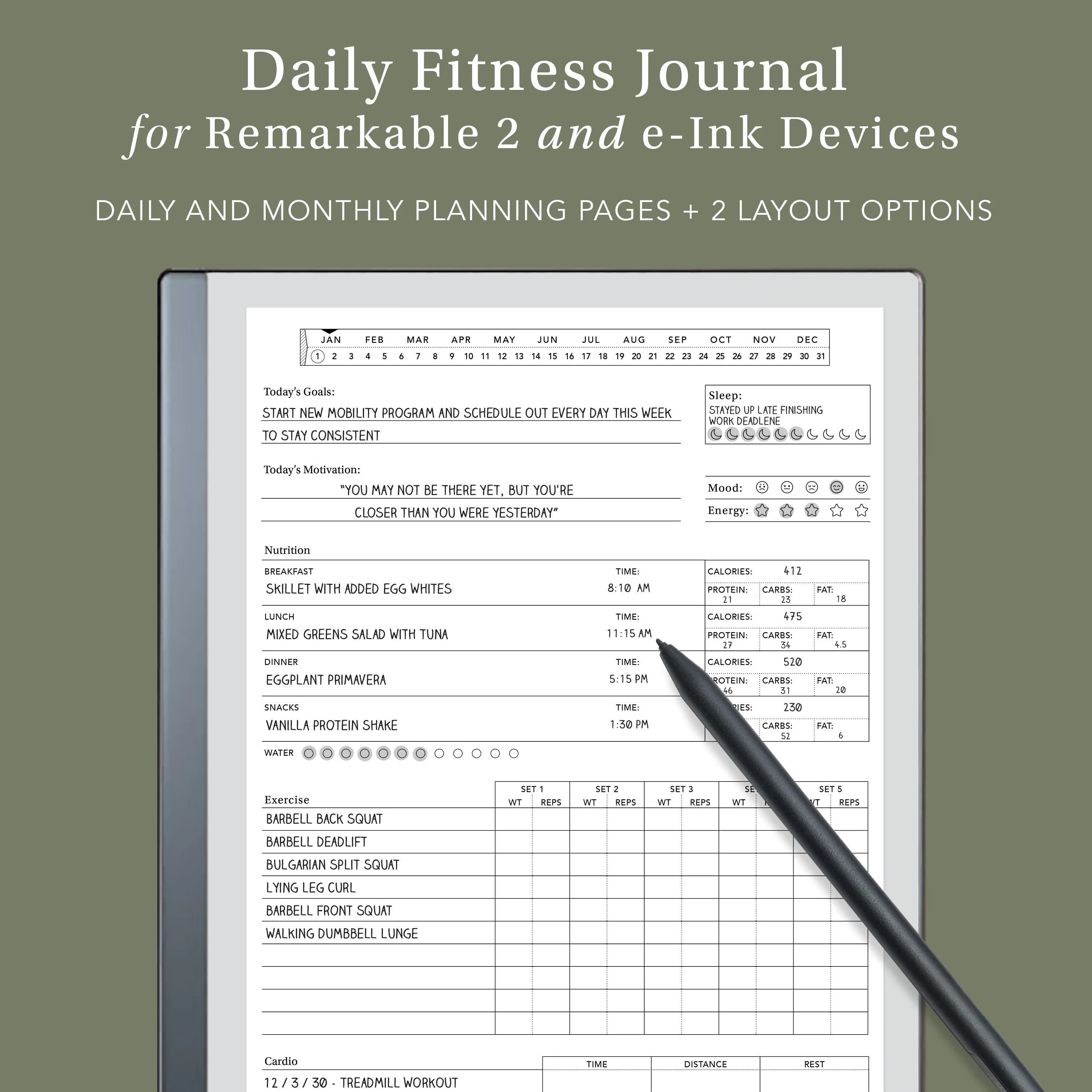
This journal has a dedicated planning page for each month of the year and a tracking page for each day of the year. You can jump to any page quickly through the date header included on every page of the journal. Simply tap the name of the month to jump to the monthly page, then tap the numbered date to navigate to the daily page.
This journal has a dedicated planning page for each month of the year and a tracking page for each day of the year. You can jump to any page quickly through the date header included on every page of the journal. Simply tap the name of the month to jump to the monthly page, then tap the numbered date to navigate to the daily page.
You'll receive an instant download that includes TWO versions of this journal:
- Version 1: Detailed Layout - pages include full page layouts with more exhaustive prompts and narrow ruled writing space.
- Version 2: Simple Layout - pages include fewer prompts with narrow ruled writing space. Wide side margins allow you to write with the toolbar expanded on your reMarkable tablet.
Importing Your Files:
This template is delivered as a PDF file, just import the PDF file to your e-Ink device to start using it!
To import your template files for use on your reMarkable tablet, visit my getting started page.
For any other e-Ink device, just search "PDF Import" instructions for your specific device.
$1.50
Original: $5.00
-70%Productivity Journal for e-Ink tablets—
$5.00
$1.50More Images


Productivity Journal for e-Ink tablets
This journal template is optimized for use on the Supernote, Boox, Remarkable 2 tablet or other e-Ink devices. If you use an iPad or Android tablet, I recommend a standard Digital Notebook.
Keep yourself on track and focus on your big goals with this daily productivity and time blocking journal. This journal features a clean and minimal layout to match the feel of a simple, paper journal.
This journal has a dedicated planning page for each month of the year and a tracking page for each day of the year. You can jump to any page quickly through the date header included on every page of the journal. Simply tap the name of the month to jump to the monthly page, then tap the numbered date to navigate to the daily page.
This journal has a dedicated planning page for each month of the year and a tracking page for each day of the year. You can jump to any page quickly through the date header included on every page of the journal. Simply tap the name of the month to jump to the monthly page, then tap the numbered date to navigate to the daily page.
You'll receive an instant download that includes TWO versions of this journal:
- Version 1: Detailed Layout - pages include full page layouts with more exhaustive prompts and narrow ruled writing space.
- Version 2: Simple Layout - pages include fewer prompts with narrow ruled writing space. Wide side margins allow you to write with the toolbar expanded on your reMarkable tablet.
Importing Your Files:
This template is delivered as a PDF file, just import the PDF file to your e-Ink device to start using it!
To import your template files for use on your reMarkable tablet, visit my getting started page.
For any other e-Ink device, just search "PDF Import" instructions for your specific device.
Product Information
Product Information
Shipping & Returns
Shipping & Returns
Description
This journal template is optimized for use on the Supernote, Boox, Remarkable 2 tablet or other e-Ink devices. If you use an iPad or Android tablet, I recommend a standard Digital Notebook.
Keep yourself on track and focus on your big goals with this daily productivity and time blocking journal. This journal features a clean and minimal layout to match the feel of a simple, paper journal.
This journal has a dedicated planning page for each month of the year and a tracking page for each day of the year. You can jump to any page quickly through the date header included on every page of the journal. Simply tap the name of the month to jump to the monthly page, then tap the numbered date to navigate to the daily page.
This journal has a dedicated planning page for each month of the year and a tracking page for each day of the year. You can jump to any page quickly through the date header included on every page of the journal. Simply tap the name of the month to jump to the monthly page, then tap the numbered date to navigate to the daily page.
You'll receive an instant download that includes TWO versions of this journal:
- Version 1: Detailed Layout - pages include full page layouts with more exhaustive prompts and narrow ruled writing space.
- Version 2: Simple Layout - pages include fewer prompts with narrow ruled writing space. Wide side margins allow you to write with the toolbar expanded on your reMarkable tablet.
Importing Your Files:
This template is delivered as a PDF file, just import the PDF file to your e-Ink device to start using it!
To import your template files for use on your reMarkable tablet, visit my getting started page.
For any other e-Ink device, just search "PDF Import" instructions for your specific device.